




Introduction
Short URLs are everywhere — in tweets, email newsletters, QR codes, SMS messages, and digital ads. Services like TRMLI make it incredibly easy to turn a long, complicated URL into something clean and clickable.
But with that convenience comes a question many users are asking: Are short URLs safe?
The short answer: yes, when used responsibly. But like any tool, short links can be misused. In this guide, we break down exactly how shortened URLs work, what risks exist, and — most importantly — 7 reliable ways to check if a link is trustworthy before you click.
What Is a Short URL and How Does It Work?
A short URL is a condensed version of a longer web address, created using a URL shortening service. When you click a short link, the shortener's server reads the request and immediately redirects your browser to the original destination URL.
For example:
- Original URL: https://yourwebsite.com/blog/how-to-use-qr-codes-for-marketing-in-2026
- Short URL: https://trmli.com/qrcodes2026
The redirect happens in milliseconds — so fast that most users don't even notice it. Reputable services like TRMLI use 301 or 302 HTTP redirects, which are standard, transparent, and safe.
Why Do People Use Short URLs?
Short URLs aren't just aesthetic — they serve real functional purposes:
- Easier to share on social media, SMS, and print materials
- Track clicks and analyze audience behavior with built-in analytics
- Generate QR codes directly from shortened links
- Branded links build trust and recognition (e.g., trmli.com/yourbrand)
- Clean up affiliate or tracking URLs that would otherwise look suspicious
Are Short URLs Dangerous? Understanding the Real Risks
Short URLs themselves are not inherently dangerous. The technology is neutral. However, bad actors can exploit link shorteners to obscure malicious destinations. Here are the primary risks to be aware of:
1. Phishing Attacks
Cybercriminals use short links to hide phishing URLs — fake login pages designed to steal your credentials. Because the destination is masked, users may not realize they're being sent to a fraudulent site.
2. Malware Distribution
A short URL could redirect to a site that automatically downloads malicious software onto your device. This is particularly dangerous on mobile devices.
3. Spam and Scam Campaigns
Short links are frequently used in spam emails and text messages to trick users into visiting unwanted or deceptive websites.
4. Redirect Chains
Some malicious actors use multiple layers of redirects (short URL → another short URL → malicious page) to make detection harder.
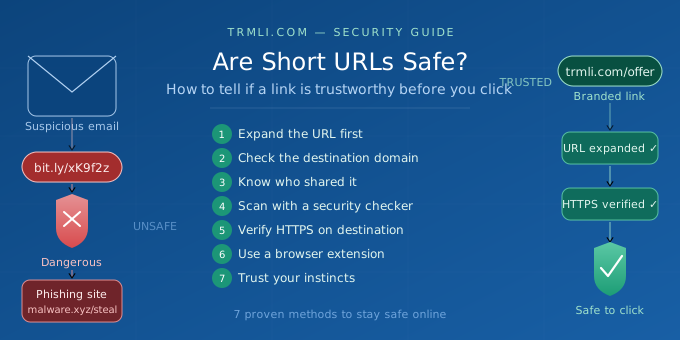
7 Ways to Tell if a Short URL is Safe to Click
The good news: you don't have to click blindly. Here are seven practical methods to verify a link before you open it.
1. Use a URL Expander Tool
Before clicking any short link, expand it to reveal the destination. Several free tools let you preview where a link leads:
- CheckShortURL.com - paste any short link and see the full destination URL
- ExpandURL.net - expands links and checks for spam
- Unshorten.it - previews the page title and destination
If the expanded URL looks suspicious, unfamiliar, or doesn't match the context in which it was shared, don't click.
2. Check the Domain of the Destination URL
Once you've expanded the URL, look closely at the domain name. Ask yourself:
- Is it a well-known, legitimate website?
- Does the domain have extra characters or slight misspellings? (e.g., paypa1.com instead of paypal.com)
- Is it using an unusual top-level domain like. xyz, .tk, or .cc unexpectedly?
Typo squatting - where scammers register domains that closely resemble trusted brands — is a common phishing tactic.
3. Look at Who Shared the Link
Context matters enormously. Ask yourself:
- Did this link come from a trusted contact, brand, or publication?
- Was it shared on a verified account?
- Does the message around the link feel unusual, urgent, or out of character?
Legitimate businesses and creators using services like TRMLI typically brand their short links (e.g., trmli.com/brandname), which adds a layer of trustworthiness.
4. Scan the Link with a Security Checker
Run the short URL (or the expanded destination URL) through a trusted link scanner:
- Google Safe Browsing (transparencyreport.google.com/safe-browsing/search) — checks if a URL has been flagged for malware or phishing
- VirusTotal (virustotal.com) — scans URLs using 70+ antivirus engines
- URLVoid — checks against multiple blacklist databases
These tools give you a fast, automated safety verdict before you visit.
5. Check for HTTPS on the Destination Page
Before you interact with any page a short URL leads to, verify that it uses HTTPS (not just HTTP). Look for:
- A padlock icon in your browser's address bar
- https:// at the start of the URL
HTTPS means the connection between your browser and the site is encrypted. While HTTPS alone doesn't guarantee a site is safe (malicious sites can use it too), the absence of HTTPS on any page asking for personal information is a serious red flag.
6. Use a Browser Extension for Real-Time Protection
Several browser extensions can automatically flag dangerous links before you visit them:
- Bitdefender TrafficLight — real-time URL scanning
- Web of Trust (WOT) — community-based trust ratings for websites
- Microsoft Defender Browser Protection (for Edge/Chrome)
These tools run in the background and alert you instantly if a link is known to be harmful.
7. Trust Your Instincts — and Verify Before You Click
If something about a link feels off, it probably is. Red flags include:
- Unsolicited messages containing links with no context
- Pressure to click immediately ("limited time," "your account is at risk")
- Links sent via unfamiliar or spoofed email addresses
- Short URLs that appear in unexpected places (random social media comments, spam forums)
When in doubt, don't click. Instead, go directly to the official website by typing the URL manually into your browser.
How Reputable URL Shorteners Protect You
Not all URL shorteners are created equal. Trusted platforms like TRMLI are built with safety and transparency in mind. Here's what to look for in a reliable URL shortener:
| Feature | What It Does |
| SSL/Bank-grade Encryption | Protects data in transit between user and server |
| Spam Protection | Flags and blocks links to known malicious sites |
| Password-Protected Links | Restricts who can access a link |
| Real-Time Analytics | Let’s link creators monitor and audit click behaviour |
| Link Management Dashboard | Full visibility over every link created |
TRMLI offers all of these features, making it one of the more security-conscious URL shortening platforms available. When you shorten a link with TRMLI, you're not just getting a shorter URL — you're getting transparency and control.
Quick Reference: Short URL Safety Checklist
Before clicking any unfamiliar short link, run through this checklist:
- Expand the URL using a tool like CheckShortURL or ExpandURL
- Verify the destination domain looks legitimate and correctly spelled
- Consider the source — is it from a trusted person or brand?
- Scan with Google Safe Browsing or VirusTotal
- Confirm the destination uses HTTPS
- Use a browser extension for automatic protection
- If anything feels suspicious, don't click
Conclusion
Short URLs are safe when used by reputable services and shared through trustworthy channels. The technology itself is sound — the risk lies in who creates the link and where it leads.
By following the seven verification methods outlined in this guide, you can confidently evaluate any short URL before clicking. And if you're the one creating short links, using a transparent, secure platform like TRMLI ensures your audience can trust every link you share.
Ready to create safe, branded short links with built-in analytics? Get started with TRMLI for free →
Tags: URL Safety, Cybersecurity, Link Shortener, Digital Marketing, Phishing Prevention, Online Security
Suggested Internal Links: How to Create a QR Code for Free | What is a URL Shortener | Branded Short Links Explained